There’s a Power App somewhere in your tenant running part of your business. Invoice approvals. Patient intake. New employee onboarding. The thing that gets mentioned in a meeting when someone asks, “wait — how do we actually handle that process?”
It was built two or three years ago by someone who’s still at the company, or maybe isn’t. It works, so nobody thinks much about it.
Then one Tuesday, someone edits the app and breaks it. Or deletes a flow. Or restructures the SharePoint list underneath it. Suddenly the process the business depends on stops working.
You may already know the default environment is the wrong place for production work. This is the adjacent problem: even when something is built well, the recovery story is shallower than the platform leads you to believe.
How do you get it back?
What Power Platform actually gives you
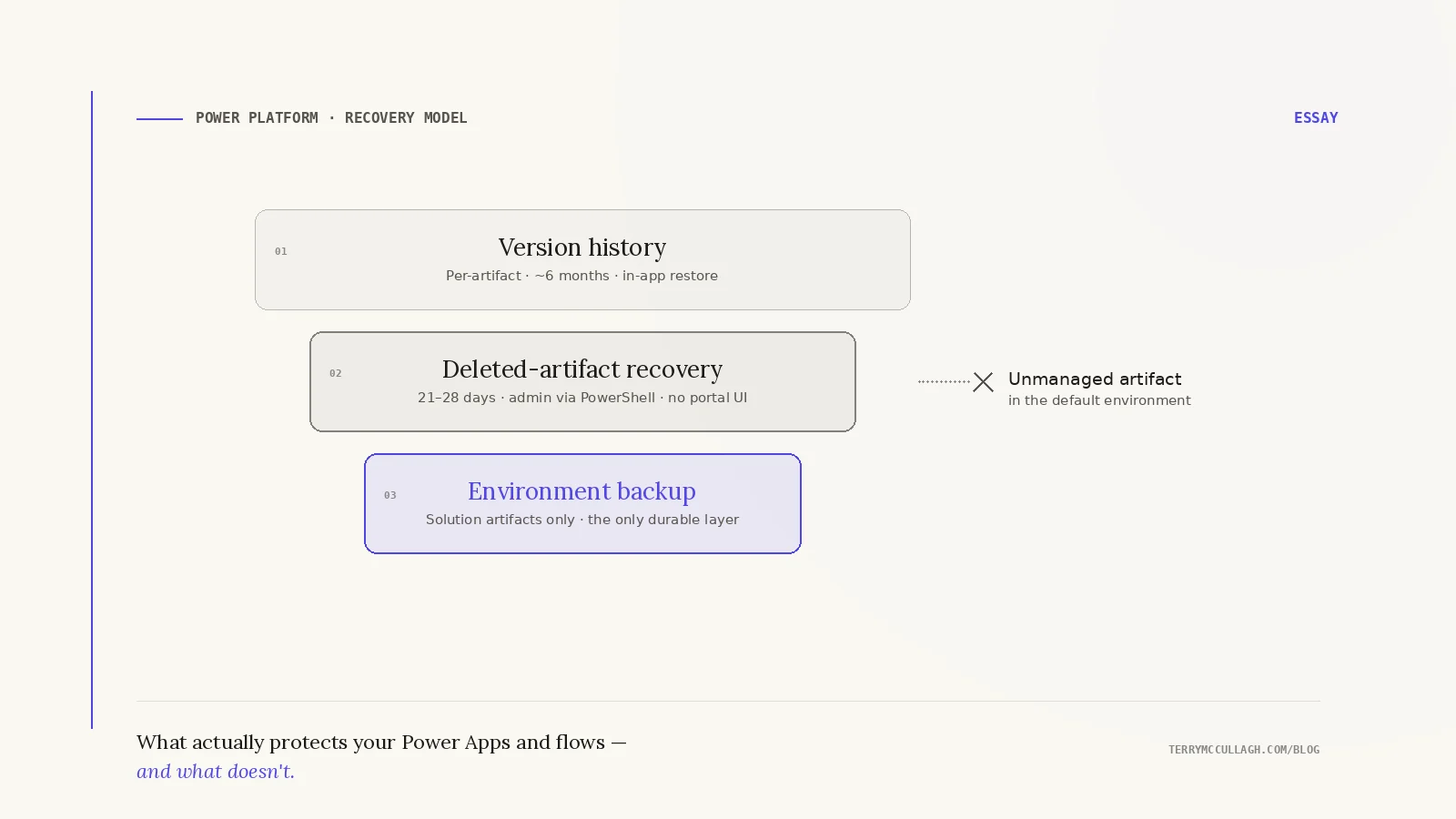
Canvas apps keep version history. You can open an app in the maker portal, view prior versions, and restore one. Microsoft retains these versions for the last six months — older versions are still technically accessible, but Microsoft notes that restoring an app older than six months “will repackage the app with the oldest version available,” and functionality may have changed.
Power Automate flows also maintain revision history, though it’s shallower and the UI is less inviting. Deleted canvas apps can be recovered by admins for roughly 28 days; deleted flows for 21 days. Both windows are hard cutoffs — past them, even Microsoft Support can’t help.
If the problem is “I broke this yesterday,” the platform often has you covered. That’s what many organizations assume “backup” means. They see a version list, assume there’s a safety net, and move on. But version history is not the same thing as operational recovery.
Where the safety net stops
The version history is tied to the individual artifact. There is no built-in point-in-time snapshot of:
- the app
- the flows it depends on
- the SharePoint columns, Dataverse tables, or other data sources it references
- the environment variables, connections, and connection references behind it
If one of those pieces changes independently, restoring the app alone may not restore a working system. You’re restoring a snapshot against a moved target.
Once an artifact is deleted beyond its recovery window — 28 days for canvas apps, 21 days for flows — recovery is impossible. Not difficult. Impossible. Microsoft Support cannot help. And even within the window, there is no portal UI to recover a deleted canvas app: an admin has to run PowerShell against the Power Platform admin module. Deleted flows can be recovered through PowerShell or through a custom admin flow built with the Power Automate Management connector.
Environment-level backups exist, but they have a sharp limitation: Microsoft’s documentation states that environment backups “include only apps and flows in a Dataverse solution.” Unmanaged artifacts in the default environment — which is where most apps and flows in most tenants actually live — are excluded from environment-level backup and restore.
The hidden operational risk
The harder failures aren’t the ones where someone breaks an app on purpose. They’re the ones where something underneath the app moves and the app quietly stops working. A SharePoint column gets renamed during a “cleanup.” A flow’s connection reference expires because the OAuth refresh token finally times out after months of inactivity. A Microsoft authentication change deprecates the connector version the flow was built against. The app’s version history is intact — and none of those versions help, because the problem isn’t in the app. It’s in the world the app depends on.
What solutions change
Solutions are Microsoft’s intended deployment model for Power Platform applications that matter to the business. A solution packages the app, flows, connection references, environment variables, custom connectors, tables, and deployment configuration into a managed unit. It can be exported, versioned, promoted across environments, and deployed into another tenant.
Instead of loose artifacts living independently in the default environment, related components move together through a deployment lifecycle. Environment-level backups now actually cover them. Deployment pipelines become possible.
A five-minute test
Pick one Power App in your tenant that actually runs a business process. Open its details page and look at the Versions tab. Now look at whether it’s part of a solution.
The first answer tells you how well-positioned you are for accidental edits. The second tells you how well-positioned you are for everything else. If the app you picked isn’t in a solution, your recovery model is probably limited to per-artifact version history and hope.
The shift most organizations miss
Microsoft optimized Power Platform for creating solutions quickly, not necessarily for operating them long term. That’s why the default experience makes it easy to build apps outside solutions in the default environment. The path of least resistance produces the worst operational outcome, and the platform doesn’t push back.
For experimentation, that’s fine. The default environment is genuinely useful for sketching ideas and testing flows. The problem starts when the experiment becomes the process the business depends on.
By then, the app everyone forgot about has quietly become business infrastructure.